Introduction
A customer walks up to your vending machine, credit card ready. They tap the screen. Nothing happens. They tap again. The interface lags. Confused, they glance at the keypad, see a confusing number-letter grid, and walk away empty-handed. This scenario plays out thousands of times daily across the U.S., and most operators never see it happen — but they feel it in their revenue reports.
Consumers now expect the same frictionless checkout experience from a vending machine that they get from a smartphone app. A clunky or outdated interface isn't just inconvenient — it's a direct drain on sales. Studies on self-service technology failures consistently point to poor interface design and outright system errors as the leading causes of abandoned transactions, each one compounding into measurable revenue loss across locations and weeks.
This article covers what makes smart vending interfaces work, which design principles drive purchases, the features operators should prioritize, and how to evaluate machines before buying. By the end, you'll have a clear framework for assessing whether your current interface is helping customers complete purchases — or quietly driving them away.
Key Takeaways
- Poor interface design causes customers to abandon transactions — 17% of self-service tech dissatisfaction stems from confusing design alone
- Cashless payment integration drives 37% higher transaction values ($2.24 vs. $1.78 for cash)
- Touchscreen responsiveness, visual clarity, and frictionless payment flows are the UX factors that convert browsers into buyers
- Smart interfaces feed real-time inventory and sales data back to operators, cutting out-of-stock events and sharpening restocking decisions
- The best machines pair an intuitive customer-facing UI with operator dashboards that surface actionable sales and inventory data
What Is a Smart Vending Machine Interface?
The vending machine interface is the full interaction layer between the machine and the user — the screen (touchscreen or display), navigation system, payment terminals, and feedback mechanisms like confirmation sounds or visual cues. Traditional machines relied on mechanical keypads and coin slots, forcing customers to memorize numeric codes and hope for the right product. Smart vending machines replace that friction with touchscreen-first design.
Modern all-digital machines present product images, pricing, nutritional information, and promotions on a single responsive screen. Instead of punching "B7" and waiting, customers see a photo of the product, tap it, confirm their choice, and pay — all on one interface. The shift from keypad-based to visual selection matches how people already interact with smartphones and self-checkout kiosks.
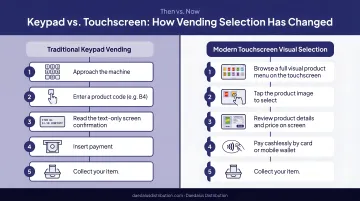
The interface isn't just a cosmetic upgrade. Behind the screen, the UI connects to backend systems that track inventory, process payments, and transmit sales data to cloud-based operator dashboards.
When a customer selects a product, the interface communicates with the machine's embedded controller via protocols like MDB (Multi-Drop Bus), which coordinates peripherals including bill validators, card readers, and dispensing motors. This backend connectivity turns the machine into a functional business tool — one that generates actionable data with every sale.
Vendekin machines, available through Daedalus Distribution, put this into practice directly. Their 10-inch and 22-inch touchscreen models integrate customer-facing UX with remote inventory tracking and real-time sales reporting — giving operators visibility into every transaction from anywhere.
How Smart Vending UX Directly Impacts Your Sales
Abandoned Transactions Cost More Than You Think
When a customer intends to buy but gives up due to interface confusion, slow response times, or payment friction, that's an abandoned transaction. While vending-specific abandonment rate data is scarce, research on self-service technologies reveals the scale of the problem: 43% of dissatisfying SST encounters were caused by technology failure, and 17% by technology design problems such as confusing navigation or poor interface flow.
Each walk-away represents lost revenue that multiplies across locations and days. The consistent thread across all of them: interface design is the fix.
The Psychology of Ease: Reducing Cognitive Load
When an interface minimizes cognitive load — the mental effort required to make a decision — users complete purchases faster and with greater confidence. A touchscreen showing a clear product image, name, and price delivers an answer in seconds. A keypad tied to faded shelf labels demands translation, memory, and guesswork.
Academic research confirms this. A study on vending machine interface systems found that effective designs must "offer efficient service with zero tolerance for human error, require no user training, and be accessible to a wide range of users." The researchers recommended transitioning from alphanumeric code input to touchscreen-based visual selection to reduce errors and speed decisions.
Visual Clarity and Trust at Point of Purchase
High-resolution displays with clear product labels, prices, and confirmation steps signal reliability and professionalism. Customers hesitate when they're unsure what they'll receive or how much they'll pay. A touchscreen that shows a product photo, price, and "Confirm Purchase" button eliminates that doubt.
Conversely, outdated or inconsistent interfaces breed uncertainty. When the interface behaves unpredictably — buttons in different places, unclear payment status, no confirmation cues — customers second-guess the transaction and walk away. That reliability is also what makes the next layer of UX — personalization — possible. Customers need to trust the machine before they'll engage with it beyond a basic purchase.
Personalization as a Revenue Driver
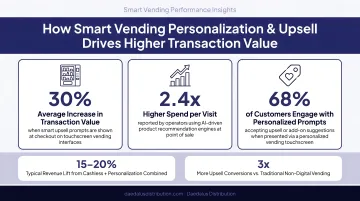
Smart interfaces can surface popular products, promotions, or "frequently bought" items directly on the screen, replicating the upsell behavior of a human cashier. Research presented at a 2018 NAMA conference found that machines prompting consumers to purchase multiple items saw a 15-20% sales lift.
Cantaloupe's 2025 Micropayment Trends Report backs this up: consumers spent 27% more per transaction at micro markets ($2.67 average) than at traditional vending machines ($2.11), largely because richer product displays and faster checkout encourage larger purchases.
Speed as a UX Metric That Matters
Modern consumers — especially in high-traffic locations like offices, gyms, or transit hubs — have short attention spans at a vending machine. A slow or multi-step interface loses sales to impatience; a fast, responsive one closes them. Research shows that among satisfying self-service encounters, 30% cited "saved time" as the primary reason for satisfaction.
A touchscreen that responds instantly to taps, displays payment confirmation in under two seconds, and dispenses products without delay keeps the transaction moving. Any lag introduces doubt and increases the likelihood of abandonment.
Key Design Principles Behind High-Performing Vending Interfaces
Clarity and Navigation Logic
The most effective vending interfaces organize products the way users think — by category (snacks, beverages, healthy options), by price, or by popularity — rather than forcing the user to scroll through a flat grid of 40 items. Clear labeling and logical flow reduce time-to-decision.
For example, a touchscreen that groups products into "Cold Drinks," "Snacks," and "Healthy Choices" lets the customer navigate directly to their desired category. A random grid sorted by slot number forces them to scan every item, increasing cognitive load and slowing the purchase.
Consistency Builds Confidence
When every step of the interface behaves predictably — same button placement, same checkout flow, same confirmation style — users develop trust in the machine. Inconsistent or unpredictable interfaces create doubt and increase transaction abandonment.
If tapping a product highlights it in green on one screen but shows no feedback on another, or if the "Confirm" button moves between the bottom-left and bottom-right corners, customers hesitate. Consistency signals that the machine works reliably.
Feedback and Confirmation Cues
Micro-interactions matter. A sound after selection, a visual highlight confirming the chosen item, a progress bar during payment — these small signals are critical for user confidence, especially for first-time users of a particular machine.
Without feedback, customers wonder: Did my tap register? Is the payment processing? Will the product actually dispense? Research on self-service technology quality identified design quality and functionality as primary drivers of SST adoption. Feedback mechanisms are a core component of design quality.
Aesthetics That Serve Function
A visually appealing interface does more than look good — it attracts attention and signals product quality. In locations where the machine must compete for attention, a bright, modern display draws customers in.
That said, design should always serve usability first. Flashy visuals that slow down navigation or obscure key information create friction — and friction costs sales.
Cashless Payment UX as a Design Decision
How a machine handles payment is a core UX element, not a separate feature. The design best practices around cashless payment flows include:
- Prominent card tap/QR code areas clearly labeled and easy to locate
- Clear payment confirmation (visual and auditory cues)
- Support for mobile wallets (Apple Pay, Google Pay) and contactless cards
- Minimal steps between product selection and payment completion
Reducing payment friction is one of the highest-leverage interface improvements an operator can make. Cantaloupe's 2025 report found that 71% of all vending sales were cashless in 2024 — and cashless transactions averaged $2.24 vs. $1.78 for cash, a 37% premium. Contactless methods (tap/NFC/mobile) accounted for 77% of those cashless sales, with mobile payment usage up over 300% in a single year.
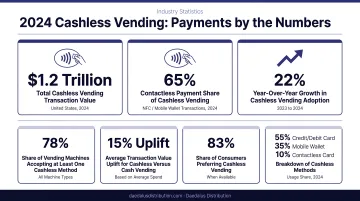
The interface design must make contactless payment the default path, not an afterthought.
Must-Have UI Features in Modern Smart Vending Machines
Responsive Touchscreen with Product Imagery and Descriptions
Customers make faster, more confident purchase decisions when they can see a real image of the product alongside the name, price, and key details (size, flavor, nutritional info) — rather than relying on physical product visibility through glass. This is especially important for new or unfamiliar products.
A touchscreen that displays a high-resolution photo of a protein bar with "Chocolate Peanut Butter, 20g Protein, $3.50" eliminates guesswork. A slot labeled "A3" with a partially visible product behind scratched glass does not.
Multi-Payment Option Support
Offering multiple payment methods is a UX imperative, not just a technical checkbox. Customers who can't pay their preferred way don't buy. Modern smart machines support:
- Credit and debit cards
- NFC/tap-to-pay (contactless cards)
- Apple Pay and Google Pay
- Traditional cash (though increasingly de-prioritized)
The Automatic Merchandiser 2025 State of the Industry survey found that 96% of operators rated cashless payment technology a "great investment," and 70% reported 90-100% of their machines are cashless-equipped. At this adoption rate, cashless capability is simply the baseline expectation.
Vendekin machines sold through Daedalus Distribution support all of these payment methods across every model — no add-on required.
Digital Advertising and Promotional Display Capability
Smart interfaces can display branded content, time-sensitive promotions, and loyalty offers directly on the screen — turning idle machine time into a marketing channel. This benefits operators both by increasing per-visit spend and by creating potential advertising revenue from brands.
For example, a machine could display a "Buy 2, Get 10% Off" promotion for a featured beverage brand during idle time, or highlight a seasonal product when a customer approaches. The Automatic Merchandiser survey found that 84% of operators rated video screens a "great investment" in 2024, up from just 9% the prior year — a dramatic shift in operator sentiment toward digital displays.
Real-Time Inventory Visibility On-Screen
When a machine can display "sold out" status clearly on the interface — rather than letting a customer select, pay, and then get nothing — it dramatically improves user trust and reduces support headaches for the operator.
Research on self-service technology failures found that 17% of dissatisfying encounters were "process failures" — where the technology appeared to work but the expected outcome didn't occur (item not delivered, account charged without product).
Customers who experienced these failures had the highest complaint rate of any category, at 68%.
Real-time inventory visibility prevents this entirely. The customer-facing UI should reflect what's actually in stock, fed by the operator's backend inventory management system. Vendekin machines — available through Daedalus Distribution — sync live inventory data to the customer-facing screen, so operators get remote tracking and customers see accurate stock status in real time.
What Operators Should Look for When Choosing a Smart Vending Machine
Evaluate the UI Holistically — Not Just the Screen Size
Don't just ask "How big is the screen?" Ask:
- How fast does the interface respond to touch inputs?
- How easy is the checkout flow from product selection to payment confirmation?
- Can the UI be customized with your own branding or promotions?
- Is the payment terminal integrated cleanly, or does it look like an afterthought bolted to the side?
A 22-inch screen means nothing if the software running on it is slow, confusing, or unresponsive.
Prioritize Machines with Backend Operator Tools That Match the Frontend Quality
The best smart vending machines pair a great customer-facing UI with operator tools that are just as functional:
- Remote monitoring dashboards
- Real-time sales reporting
- Automated low-stock alerts
- Easy price updates
- Route optimization based on sales data
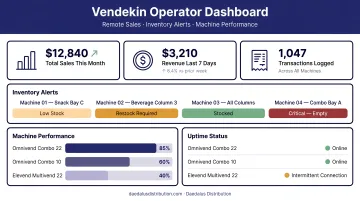
Operators who settle for a nice screen but weak backend software end up managing their business blind. They don't know which machines are underperforming, which products are selling, or when restocking is needed until they physically visit the location.
Daedalus Distribution's Vendekin-powered machines combine touchscreen UX with remote inventory tracking and sales data reporting built in. The Vendekin platform lets operators check machine performance, stock levels, and revenue from any device — no separate software license required.
Consider Support and Serviceability as Part of the UX Equation
A strong backend is only as good as the support behind it. Software updates, hardware issues, and UI customization needs all require fast turnaround to keep machines profitable rather than sitting idle.
Choose a vendor with U.S.-based service and maintenance access. Daedalus Distribution operates a dedicated U.S.-based parts and service center in Summerville, South Carolina, providing fast support and nationwide delivery. Their team is available Monday through Friday, 8:00 AM – 5:00 PM EST, so operators get help when they need it, not weeks after filing a ticket.
Frequently Asked Questions
What is the MDB interface?
MDB (Multi-Drop Bus) is a communication protocol used inside vending machines that allows peripheral devices — like bill validators, coin mechanisms, and card readers — to communicate with the machine's main controller. Smart vending machines still use MDB as the underlying hardware standard but pair it with modern software and touchscreen interfaces on top.
How do vending machines use embedded systems?
Vending machines rely on embedded systems — dedicated computing hardware built into the machine — to handle payment inputs, dispensing mechanisms, touchscreen interfaces, and sales data transmission to cloud dashboards. These compact boards process transactions, coordinate peripherals via MDB, and power the customer-facing UI.
What are the parts of a vending machine?
The main components include the cabinet/frame, product storage and dispensing mechanism (coils, conveyors, or lockers), the user interface (screen or keypad), payment terminal (cash, card, or contactless), control board/embedded system, and a connectivity module for remote monitoring in smart machines.
Can you put a $2 bill in a vending machine?
Most modern vending machines with updated bill validators can accept $2 bills, though acceptance varies by machine age and bill acceptor model. That said, smart vending machines increasingly reduce this friction entirely by prioritizing cashless payment options like tap-to-pay and mobile wallets.
Is there a universal key for vending machines?
While there are common key types (like the T-handle or tubular keys) used across many traditional vending machines, there is no single universal key. Modern smart vending machines often use digital or electronic access controls that are unique to each operator, improving security and reducing unauthorized access risk.