Introduction
Contactless vending is now mainstream — tap-to-pay terminals, QR codes, and mobile wallets are standard on modern machines. Operators and location owners often ask whether these features require a constant internet connection — and what happens when connectivity cuts out.
The short answer: contactless payment processing requires internet for real-time authorization, but the machine itself can still dispense products under certain conditions without it. What follows breaks down that distinction, your connectivity options, and how to keep machines reliably online.
Key Takeaways
- Contactless payment authorization requires an active internet connection to process in real time
- Basic vending functions (dispensing products, accepting cash) can continue offline, but cashless payments will be paused
- Most smart vending machines store transaction data locally and sync automatically once connectivity restores
- WiFi, cellular (4G/LTE), and Ethernet are all viable options; cellular is the most reliable choice for commercial deployments
The Short Answer: Yes, Contactless Vending Machines Need Internet
The vending machine as a mechanical unit can technically operate without internet — dispensing products and accepting cash. But the contactless payment system, which relies on real-time communication with payment processors and card networks, cannot function fully without it.
"Contactless" refers to how the customer pays (tap, scan, NFC), not how the machine operates. The payment authorization step is where internet becomes non-negotiable.
Payment processing isn't the only reason connectivity matters. Most smart vending features also require a live connection:
- Remote inventory tracking with automated alerts
- Real-time sales reporting and analytics
- Machine health monitoring and performance data
- Dynamic price updates and promotional campaigns
- Fleet management across multiple locations
For operators running multiple locations, connectivity isn't optional — it's what makes the machine manageable at scale. Vendekin machines distributed through Daedalus Distribution are built with these remote features included, so operators get inventory alerts and sales data without additional setup.
How Contactless Payments Work — And Why Internet Is Non-Negotiable
The Real-Time Authorization Flow
Every contactless payment follows a defined sequence that happens in seconds:
- Customer taps card or phone — The NFC reader emits an electromagnetic field at 13.56 MHz that powers the card's embedded chip
- Reader captures payment data — The terminal requests the card's Primary Account Number (PAN) and expiry information, generating a one-time dynamic cryptogram that prevents replay attacks
- Machine encrypts and sends request — The terminal constructs an ISO 8583 authorization message and transmits it over the internet to the payment processor
- Processor forwards to card issuer — The payment processor routes the request to the customer's bank
- Bank approves or declines — The issuing bank verifies the card is active, has sufficient funds, and hasn't been reported stolen
- Approval signal returns — The response travels back through the processor to the terminal
- Product is dispensed — The vending machine controller releases the product
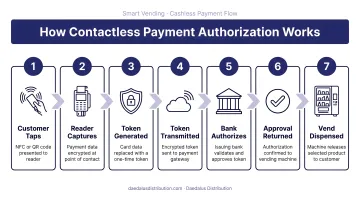
This entire loop requires a live internet connection at the moment of the transaction. Without internet, the machine cannot reach the payment processor, which means it cannot confirm whether a card is valid or has sufficient funds. This is a security and fraud-prevention requirement, built into the payment architecture by design.
Store-and-Forward: A Limited Fallback, Not a Solution
Some machines support store-and-forward (S&F) — a fallback mechanism that allows terminals to approve transactions locally when internet connectivity is temporarily lost, then forward stored transaction data for processing once connectivity restores.
How Store-and-Forward Works:
- Terminals approve small transactions offline using pre-authorized limits
- Transactions are stored in local device storage
- Data uploads automatically when connectivity restores
The tradeoff is significant. Once connectivity drops, operators lose key protections that online authorization provides:
Critical Limitations:
- EMV contactless/NFC only — no magstripe support
- Single-vend mode only — no multi-vend sessions, extra charges, or discounts
- Merchant assumes full liability — chargebacks and failed captures fall entirely on the operator
- Limited authorization rates — typically 95% or higher, but not guaranteed
- Not a business strategy — designed as a temporary safety net for brief outages
Nayax's offline payments guide confirms this fallback exists but emphasizes the liability and functional constraints that make it unsuitable as a primary operating mode.
Card Network Rules Add Structural Constraints
Mastercard classifies vending machines as CAT 3 (Limited Amount Terminals), which permits offline authorization only within limited-amount thresholds and with no cardholder verification method required. Transactions exceeding regional limits must either be declined or escalate to higher security verification.
That real-time verification loop is also what keeps contactless vending secure. Internet connectivity isn't just a technical dependency — it's what separates a compliant, fraud-resistant transaction from a liability risk for the operator.
What Still Works When Your Vending Machine Goes Offline
Functions That Continue Without Internet:
- Physical product dispensing — mechanical systems operate independently
- Cash acceptance — coin and bill mechanisms work without connectivity
- Internal inventory tracking — data stored locally for later sync
- Basic error detection — hardware diagnostics continue
Functions That Stop Working:
- Cashless and contactless payments — in most cases, completely unavailable
- Real-time inventory monitoring — no alerts for low stock or out-of-stock items
- Remote price updates — operators cannot adjust pricing remotely
- Sales data syncing — operator dashboards show stale data until reconnection
- Machine health notifications — no alerts for malfunctions or performance issues
That gap between what keeps running and what shuts down is what makes connectivity planning so critical. The good news for brief outages is that modern machines handle them gracefully.
Offline Resilience in Modern Machines
Modern smart vending machines store transactions locally and sync automatically once connectivity is restored, so no data is permanently lost during short disruptions.
The Revenue Impact of Prolonged Outages
Prolonged offline periods create serious operational problems for contactless-first locations. According to Cantaloupe's 2025 Micropayment Trends Report, 71% of vending machine transactions were cashless in 2024, with 77% of those being contactless. This means the majority of vending revenue now depends on internet connectivity.
The revenue gap is even more pronounced when you factor in transaction values. Cantaloupe reports the average cashless ticket is $2.24 versus $1.78 for cash — a 37% increase per transaction. So when a machine's cashless system goes offline, operators lose both the volume (71% of transactions) and the higher-value segment simultaneously.
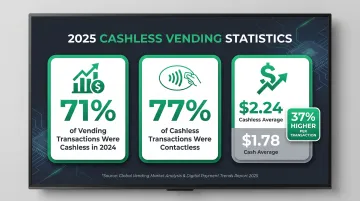
In many urban locations, cashless-only customers represent the majority of potential sales. That combination of lost volume and lost ticket value makes prolonged outages significantly more costly than a simple transaction count implies.
Connectivity Options: WiFi, Cellular, and Ethernet for Vending Machines
Three Primary Connectivity Methods
1. Ethernet (Wired):
- Most stable and reliable connection type
- Ideal when a hardwired network port is available at the location
- Requires proximity to a router or network switch
- One-time installation cost with no recurring fees
- Best for: Fixed indoor locations with existing network infrastructure
2. WiFi:
- Flexible and cost-effective when piggybacking on existing location network
- Susceptible to signal drops, interference, and network changes
- Requires network credentials and cooperation from location owner
- Performance varies based on distance from router and obstacles
- Best for: Locations with dedicated, operator-controlled WiFi networks
3. Cellular (4G/LTE):
- Most reliable and location-independent option
- Uses a SIM card and connects directly to mobile carrier towers
- Does not depend on location's network infrastructure
- Works in remote or outdoor locations
- Best for: Commercial deployments with uptime requirements
Cost Comparison
| Connectivity Type | Upfront Cost | Monthly Cost | Best Use Case |
|---|---|---|---|
| WiFi | $50–$150 (adapter) | $0 (if using existing network) | Operator-controlled networks in fixed locations |
| Ethernet | $0–$100 (cable/adapter) | $0 | Locations with available network ports |
| Cellular (4G/LTE) | $150–$400 (modem) | $10–$40 (data plan) | Commercial deployments, remote locations, high-uptime requirements |
Why Most Commercial Operators Choose Cellular
— connect the machine to whichever band delivers a more stable signal at its specific location.
How to Keep Your Contactless Vending Machine Reliably Connected
Before Installation: Test and Verify
Signal Strength Testing:
- Test signal strength at the exact machine placement location (not just the room)
- Check carrier coverage maps if using cellular
- Confirm router proximity and network stability if using WiFi
- Verify the machine's connectivity module is compatible with the chosen network type
Network Compatibility:
- Ensure cellular modems support 4G/LTE (not obsolete 2G/3G networks)
- Confirm WiFi adapters support the location's band (2.4 GHz or 5 GHz)
- Verify Ethernet ports are available and accessible
Ongoing Maintenance Strategies
Minimize Downtime:
- Use multi-network SIM cards that auto-failover between carriers
- Set up remote monitoring alerts so connectivity drops trigger immediate notifications
- Schedule periodic connectivity checks as part of routine service visits
- Budget for external antenna kits when deploying cellular-connected machines in metal enclosures
Security Best Practices:
- Ensure the machine uses encrypted, PCI-compliant payment terminals
- Connect to secure, password-protected WiFi networks only
- Avoid open public networks, which create data security vulnerabilities
- Maintain up-to-date firmware on connectivity modules
Staying connected pays off beyond just processing payments. Vendekin machines distributed by Daedalus Distribution include remote inventory tracking and sales data reporting, so you can restock smarter and catch revenue gaps before they grow — but only when your connection holds.
Frequently Asked Questions
How does a contactless vending machine work?
A contactless vending machine uses an NFC-enabled or QR-based payment terminal to capture customer payment data, encrypts it, and sends it over the internet to a payment processor for authorization. Once approved, the machine controller releases the product.
Do vending machines need an internet connection?
Traditional cash-only machines do not need internet, but modern smart vending machines with contactless payments, remote monitoring, and sales tracking all require an active internet connection to function fully.
Can I pay contactless with no internet?
In most cases, no. Contactless payment requires real-time internet authorization. Some machines support limited store-and-forward offline buffering for small transactions, but this is a short-term fallback and not reliable for extended outages.
Why is my vending machine losing its internet connection?
Common causes include weak WiFi signal, SIM card or carrier outage, router/modem fault, or a misconfigured network setting. Check signal strength, reboot the modem/router, and contact your connectivity provider if the issue persists.
Can I use 2.4 GHz and 5 GHz simultaneously?
Yes, dual-band routers support both frequencies simultaneously without conflict. For vending machines, 2.4 GHz is the better choice — it delivers stronger range and wall penetration, especially in larger or multi-room locations.